Video Notes / for YouTube

Watch a video.
Keep the parts
that matter.

A Chrome extension that turns every YouTube watch page into a notebook. Timestamped notes, screenshots, search, and clean exports — without ever leaving the video.
Add to Chrome — free See what's inside → v3.0  ·  Free  ·  $9 one-time for Pro
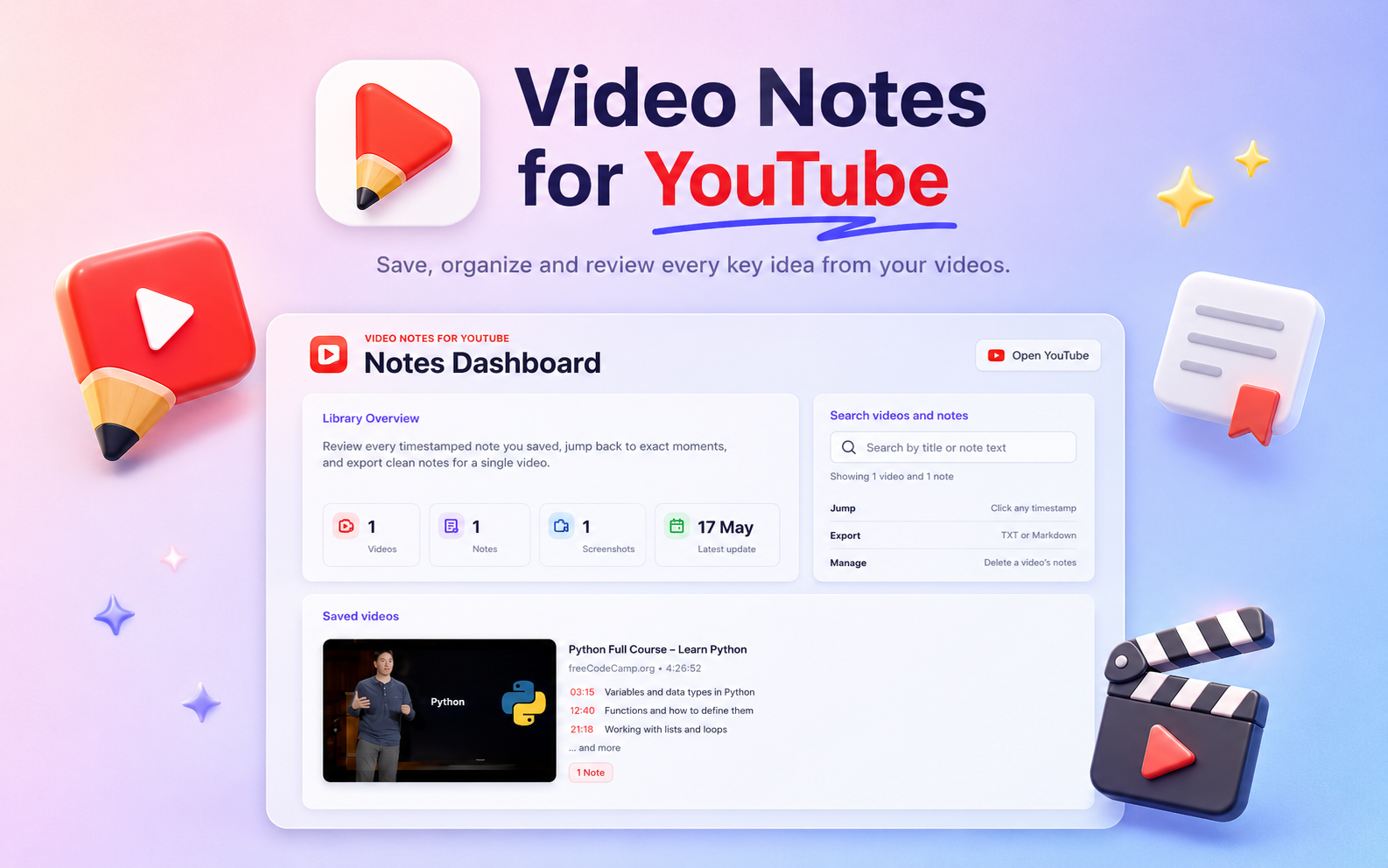
The Notes Dashboard — every saved video and its timestamped notes in one place.
Fig. 01 — Dashboard Every video you've watched, with timestamps that jump straight back to the moment. Notes are stored on-device — there is no account. "It's a notebook that knows the clock."
02:14 § Why this exists

You took notes somewhere
you just can't find them now.

01 / 03
Notes where the video is.
The panel lives inside YouTube's sidebar. No second tab, no second app, no copy-pasting timestamps by hand.
02 / 03
Click a time, jump there.
Every note carries the exact second it was written. Tap the timestamp and the player seeks to it — no scrubbing.
03 / 03
Yours, on your machine.
Everything is in chrome.storage.local. No server, no account, no telemetry. Verifiable in the Network tab.
05:47 § Features

Built for people who
actually watch to learn.

Twelve small things that add up to a different way of using YouTube.

Core. Free forever.
Everything you need to take notes on a video. No account, no trial timer.
8 features · $0
F-01Core

Timestamped notes

Every note is stamped with the exact playback time. Click the timestamp to jump straight back to the moment you wrote it — the panel and the player stay in sync.

F-02Core · capped

Screenshots

Capture the current frame alongside any note. Stored locally, shown inline. Free is capped at 10 screenshot notes total — Pro is unlimited.

F-03Core

Dashboard

A full-page view of every note across every video — grouped, sorted, and searchable.

F-04Core

Export to TXT & Markdown

One click to a clean .txt or .md. In Markdown, timestamps become clickable links.

F-05Core

Real-time search

Filter notes as you type — inside the panel and across every video on the dashboard. Matches are highlighted.

F-06Core

Inline editing

Edit any note in place. Ctrl+Enter to save, Esc to cancel. No modals.

F-07Core

Undo delete

A four-second toast lets you restore a deleted note before the change is committed.

F-08Core

Light & dark theme

Defaults to your system preference. Toggle with a click; the setting persists across sessions.

Pro. Nine dollars, once.
For people who live in their notes. Unlocks tags, smart capture, integrations, and bulk actions across both surfaces.
11 features · $9 one-time
In the YouTube panel 4 features
F-09Pro · Panel

Note tags

A tag field on every note. Comma-separate as many as you like; filter the dashboard by any of them.

F-10Pro · Panel

Smart Pause

The video pauses the moment you start typing and resumes when you click away. Hands never leave the keyboard.

F-11Pro · Panel

Screenshots, unlocked

Unlimited screenshot notes, plus a quality picker: Low, Med, or High. Free is capped at 10 captures at Med.

F-12Pro · Panel

Alt + S shortcut

Press Alt+S to save a note from anywhere on the page — no need to find the button.

On the dashboard 7 features
F-13Pro · Dashboard

Obsidian export

Per-video .md with frontmatter, wikilinks, and timestamps — formatted to drop straight into your vault. One free trial included.

F-14Pro · Dashboard

Notion export

Per-video Markdown formatted for paste-into-Notion. One free trial included.

F-15Pro · Dashboard

Inline note editing

Edit any note directly from the dashboard without opening the source video. Saves where it sits.

F-16Pro · Dashboard

Bulk export — TXT

Download every video's notes as .txt in one shot.

F-17Pro · Dashboard

Bulk export — MD

Same as above, but as Markdown bundles with timestamp links preserved.

F-18Pro · Dashboard

Tag filtering

Filter every note in the dashboard by any tag you've used.

F-19Pro · Dashboard

Unlimited storage

Free is capped at 10 MB of local storage — enough for hundreds of text notes, fewer with screenshots. Pro lifts the cap entirely and adds a live usage indicator.

09:30 § In action

A look at the thing
you're actually installing.

Real screenshots from the extension. No mockups.
01
Dashboard
All your notes, at once.
Every saved video, every timestamp, every screenshot — searchable across the whole library.
Notes dashboard with library overview and saved videos.
02
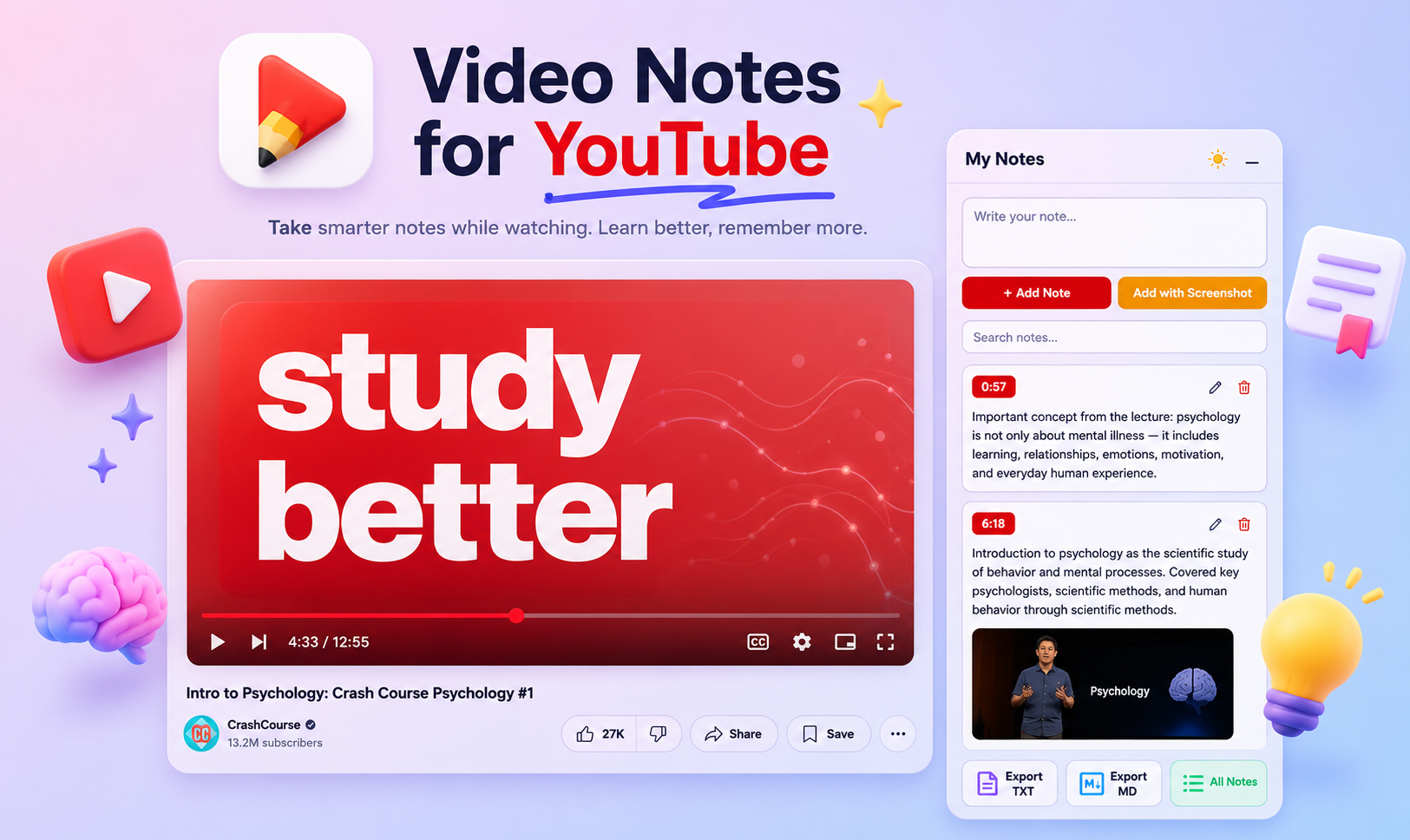
In the sidebar
Notes next to the video.
The panel docks into YouTube's right column. Write, timestamp, snapshot, and seek — all in one viewport.
Notes panel docked beside a YouTube watch page.
03
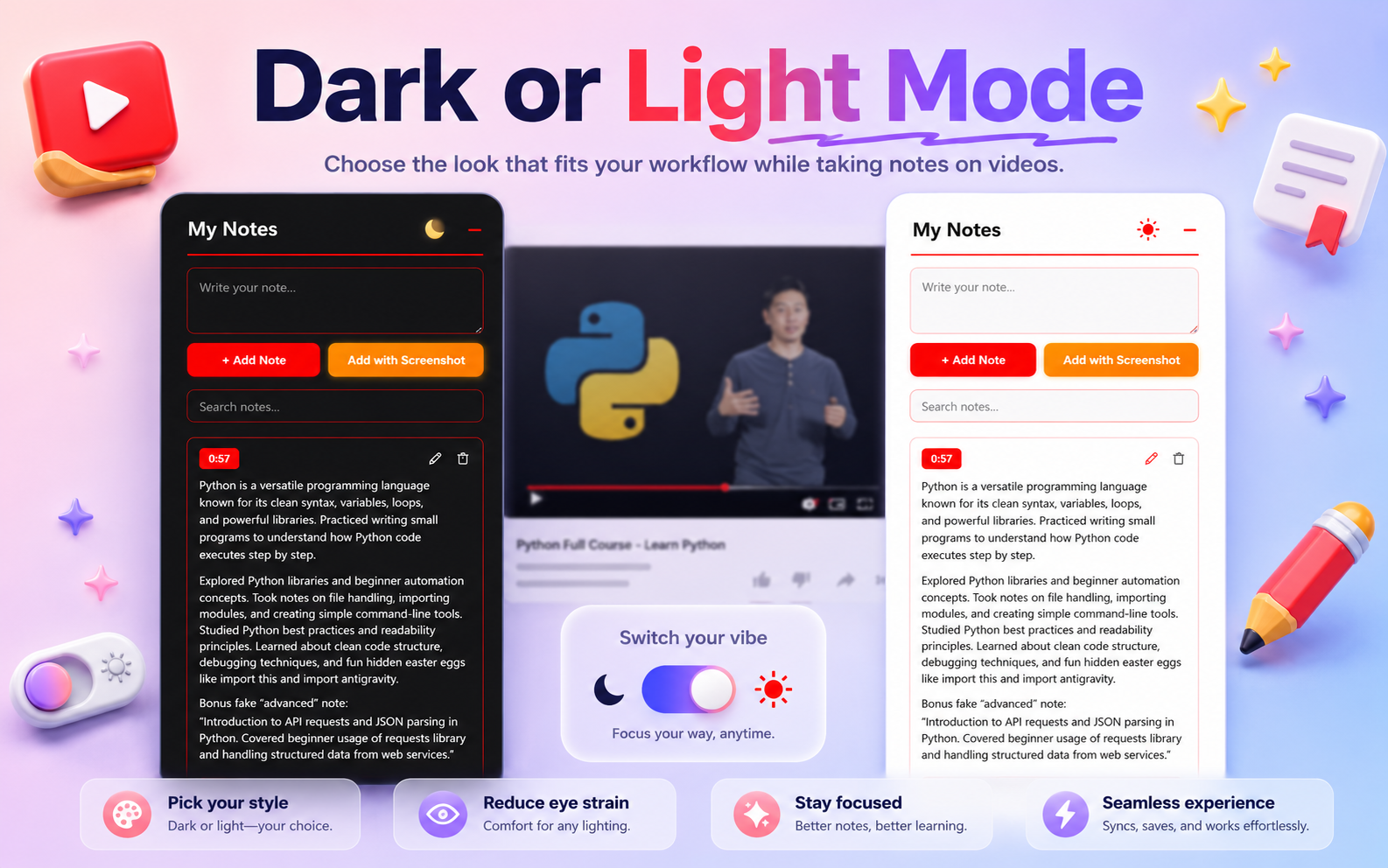
Light & dark
Two looks. Same notes.
Defaults to your system theme; toggle manually any time. Setting persists across sessions.
Side-by-side dark and light theme of the notes panel.
14:02 § How it works

Thirty seconds
from install to first note.

No account, no setup wizard, no cloud sync to wait for.

  1. Step 01 — Install
    Add it to Chrome.
    From the Chrome Web Store. About four clicks, including pinning the icon to your toolbar.
  2. Step 02 — Open
    Visit any video.
    The My Notes panel appears automatically on every youtube.com/watch page.
  3. Step 03 — Write
    Type. Hit save.
    Press Ctrl+Enter. The current timestamp is captured automatically — no need to look at the clock.
  4. Step 04 — Return
    Jump back any time.
    Click any timestamp in your note list and the player seeks straight to it. Your notes persist across refreshes, tabs, and browser restarts.
18:21 § Privacy

Your notes never leave
your browser.

No backend. No account. No analytics. Every note is stored in Chrome's local extension storage on your own machine. The video stays on YouTube; your notes stay with you. Nothing is ever transmitted to a server we run, because we don't run any.

No account No telemetry No third-party scripts No cloud sync
19:44 § Shortcuts

Keep both hands
on the keyboard.

Every core action has a shortcut. The mouse is optional.

Focus the note field from anywhere on the page Alt+N
Add note from the textarea Ctrl+Enter
Save while editing an existing note Ctrl+Enter
Cancel editing Esc
21:08 § Pricing

Free to start.
Nine dollars, once, for the rest.

No subscription. No trial timer. No "seats." Pay once and the Pro features unlock forever.

Free
Forever
$0 always
  • Timestamped notes
  • Screenshots (up to 10)
  • Export to TXT & Markdown
  • Dashboard
  • Real-time search
  • Light & dark theme
  • Keyboard shortcuts
  • 10 MB local storage
Get the free extension
Installs from the Chrome Web Store.
Pro
One-time
$9 paid once
  • Everything in Free
  • Note tags & tag filtering
  • Smart Pause (auto-pause on typing)
  • Unlimited screenshots + quality control
  • Alt+S add-note shortcut
  • Obsidian & Notion exports
  • Bulk export — TXT & Markdown
  • Dashboard inline editing
  • Unlimited local storage (no 10 MB cap)
Get Pro — $9 →
Secure checkout. Lifetime access.
24:55 § End card

Stop forgetting
what you just watched.

Free. Private. No signup. Works on every YouTube video.